
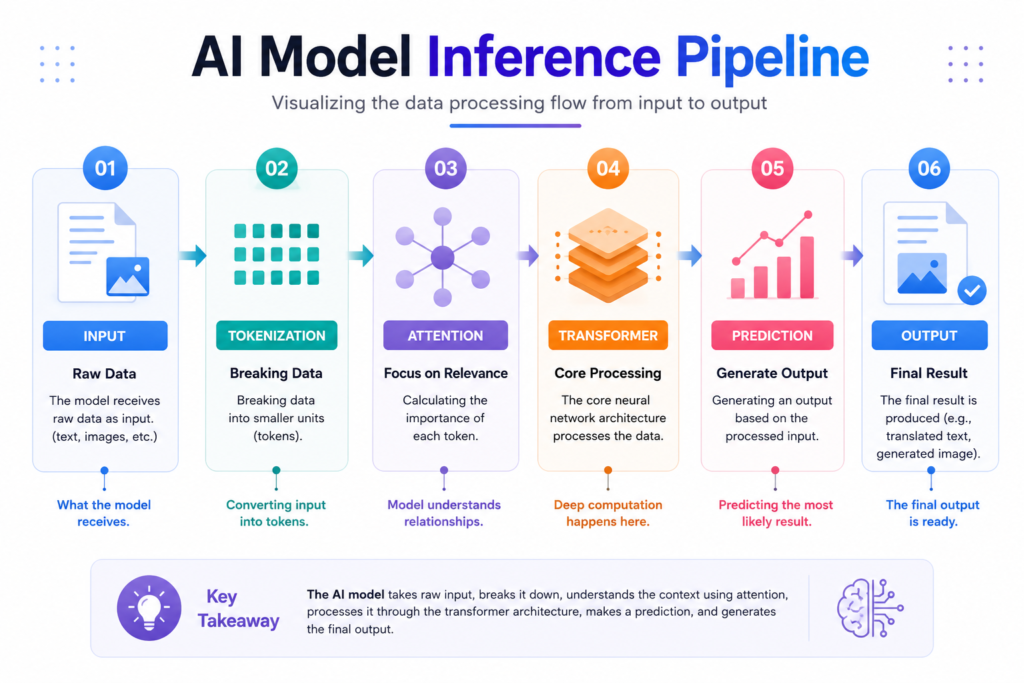
Introduction to Large Language Models (LLMs)
Artificial intelligence is everywhere today — from chatbots to writing assistants. But have you ever wondered how these tools actually understand what you type and respond so naturally?
That’s where Large Language Models (LLMs) come in.
LLMs are advanced AI systems trained on massive amounts of text data. They learn how language works — grammar, meaning, tone — and use that knowledge to generate human-like responses. Whether it’s answering questions, writing content, or helping with coding, LLMs are behind many tools we use daily.
But here’s the reality 👇
Even though LLMs are powerful, they don’t always feel easy to use.
Many users feel:
- Confused about what to ask
- Unsure why they got a certain answer
- Frustrated when responses feel wrong
So what makes the difference?
👉 Good design.
A well-designed interface can turn a complex AI into something simple, intuitive, and even enjoyable. Let’s explore how.
Why Do LLMs Feel Complicated?
At first glance, using AI seems simple — type something, get a response.
But in practice, many users struggle. Why?
🔹 1. Too Much Technical Language
Words like tokens, transformers, or fine-tuning can overwhelm beginners.
🔹 2. Unpredictable Answers
Sometimes the AI gives great answers. Other times… not so much.
🔹 3. Lack of Understanding
Most users don’t know how the system works — which makes it harder to use effectively.
👉 Result: confusion, frustration, and low trust.
That’s why UX (User Experience) design is critical.
Core UX Principles for AI Interfaces
If you want users to actually enjoy using AI, these principles matter:
✅ Clarity
Keep everything easy to understand. No confusing layouts or jargon.
✅ Transparency
Let users know:
- What the AI can do
- What it can’t do
✅ Feedback
Show users what’s happening:
- Loading indicators
- Response progress
- Suggestions
✅ Control
Let users guide the experience:
- Edit responses
- Ask follow-ups
- Adjust outputs
✅ Trust
Without trust, users won’t rely on AI.
👉 Good UX = Confidence + Comfort
Key Interaction Patterns in AI Products
Different AI tools use different interaction styles. The best ones feel natural and helpful.
💬 Chat Interfaces
Like talking to a human — simple and familiar.
✍️ Prompt Inputs
Users type instructions or questions.
Better prompts = better results.
⚡ Streaming Responses
Responses appear gradually → feels faster and more interactive.
💡 Suggestions & Auto-Complete
Helps users when they don’t know what to ask.
✏️ Editable Outputs
Users can tweak AI responses → more control, better results.
Designing Better Prompts and Responses
A big part of UX is how users communicate with AI.
Here’s how to improve it:
🔹 Keep it Clear
Avoid long, confusing prompts.
🔹 Use Natural Language
Write like you speak.
🔹 Guide the User
Give examples or suggestions.
🔹 Stay Contextual
Make sure the AI understands the situation.
👉 Small improvements here = huge UX gains
How to Build Trust in AI Outputs
Trust is everything.
If users don’t trust the AI, they won’t use it.
🔸 Show Confidence Levels
Let users know how reliable the answer is.
🔸 Add Sources or References
Helps users verify information.
🔸 Handle Errors Gracefully
Admit when the AI is unsure.
🔸 Explain Responses
Give simple reasoning when possible.
👉 Honest AI = Trusted AI
Common UX Challenges in AI Products
Even great AI tools have problems.
⚠️ Hallucinations
AI sometimes gives wrong or made-up answers.
⚠️ Inconsistency
Same question → different answers.
⚠️ Over-Reliance
Users depend too much on AI.
⚠️ Lack of Control
Users feel stuck or limited.
✅ Solutions:
- Add verification tools
- Guide user inputs
- Provide editing options
- Encourage critical thinking
Best Practices for Designing AI Interfaces
Want to build a great AI product? Follow these:
✔️ Keep the Purpose Clear
Users should know what the tool does instantly.
✔️ Use Real User Feedback
Test with real people.
✔️ Make It Conversational
Human-like interactions feel easier.
✔️ Design for Everyone
Accessibility matters.
✔️ Reduce Friction
Less confusion = better experience
Real-World Examples
Here’s how companies are using LLMs effectively:
🤖 AI Chatbots
Used in customer support — fast, responsive, always available.
💻 Coding Assistants
Help developers write code faster and smarter.
✍️ Writing Tools
Improve grammar, tone, and clarity.
👉 What they all have in common?
Good UX design.
Conclusion
LLMs are powerful — but power alone isn’t enough.
Without good design, even the best AI can feel confusing and frustrating.
But with the right UX approach, you can create AI interfaces that:
- Feel natural
- Build trust
- Deliver real value
👉 The future of AI isn’t just about smarter models
👉 It’s about better user experiences
FAQs
❓ What is an LLM?
A large language model is an AI system that understands and generates human-like text.
❓ Why is UX important in AI?
Because it makes complex AI systems easy and enjoyable to use.
❓ What makes a good AI interface?
Clarity, trust, feedback, and user control.
❓ Can AI be fully trusted?
Not always — users should verify important information