
Stop cold emails from going to spam by following proven email deliverability strategies. Whether you’re running cold outreach or email marketing campaigns, this guide will help improve your inbox placement.
If your cold emails are consistently landing in spam, your campaigns will struggle no matter how good your offer is. Poor sender reputation, missing email authentication, high bounce rates, spam-triggering content, and sending emails too quickly are some of the most common reasons.
In this guide, you’ll learn exactly why cold emails go to spam and discover practical, proven strategies to improve your email deliverability. We’ll also cover email warmup, sender reputation, authentication, and tools that can help improve inbox placement.
Cold email remains one of the most effective lead generation strategies for building business relationships and growing sales. However, one of the biggest challenges marketers, agencies, and business owners face is getting their emails into the recipient’s inbox instead of the spam folder.
If your cold emails are consistently landing in spam, your campaigns will struggle no matter how good your offer is. Poor sender reputation, missing email authentication, high bounce rates, spam-triggering content, and sending emails too quickly are some of the most common reasons.
In this guide, you’ll learn exactly why cold emails go to spam and discover practical, proven strategies to improve your email deliverability. We’ll also cover email warmup, sender reputation, authentication, and tools that can help improve inbox placement.
What Is Email Deliverability?
Understanding email deliverability is the first step to stop cold emails from going to spam.
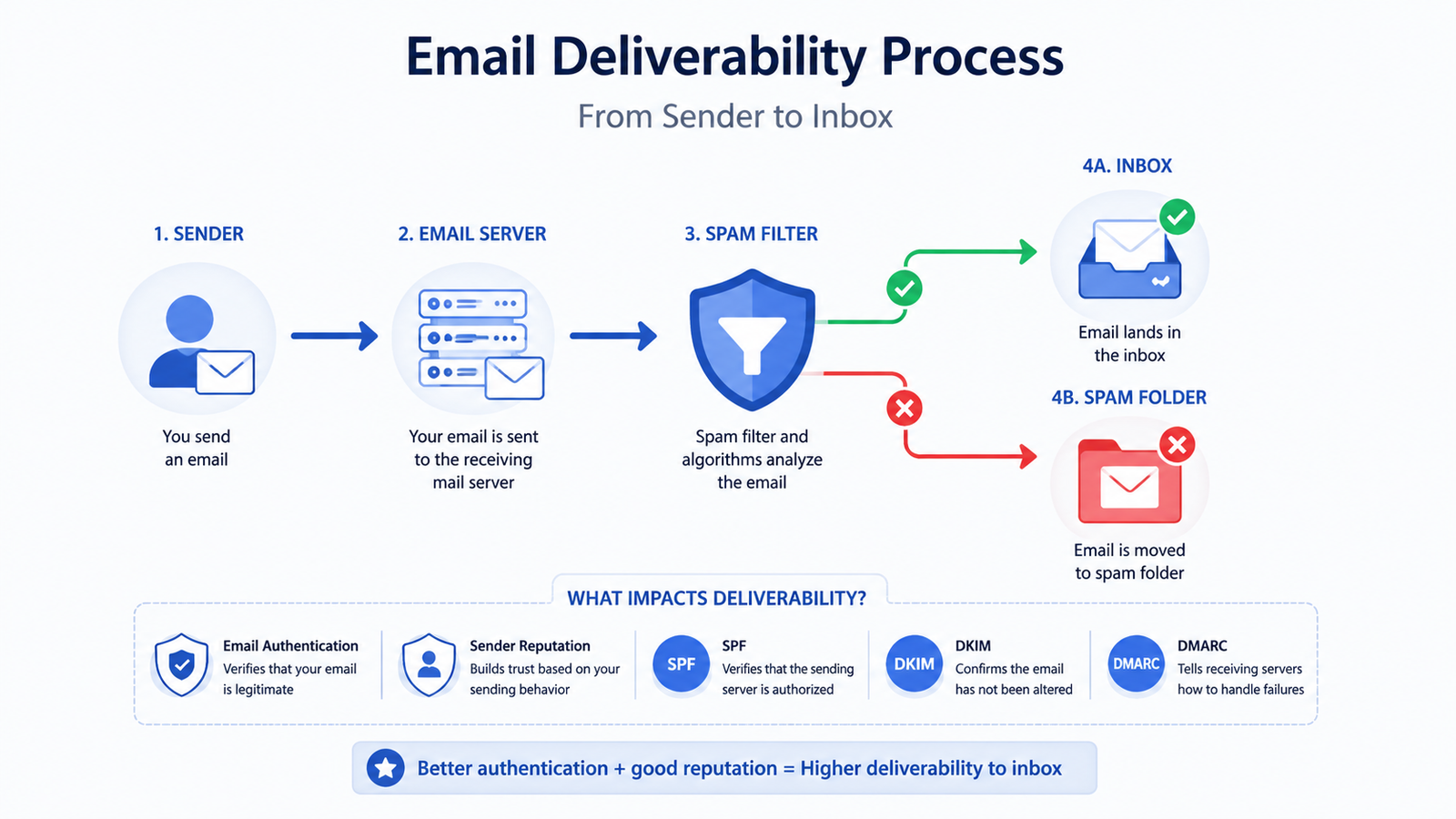
Email deliverability is the ability of your emails to reach your recipient’s inbox instead of being filtered into the spam folder. It’s one of the most important factors in cold email marketing because even a well-written email cannot generate replies if it never reaches the inbox.
Email deliverability depends on several factors, including your sender reputation, domain authentication (SPF, DKIM, and DMARC), email content, bounce rate, spam complaints, and recipient engagement. Improving these factors helps increase inbox placement and overall campaign performance.
Why Do Cold Emails Go to Spam
Cold emails usually end up in the spam folder because email providers like Gmail, Outlook, and Yahoo evaluate every message before deciding whether it belongs in the inbox. If your email or domain shows signs of poor reputation or suspicious behavior, it is more likely to be filtered as spam.
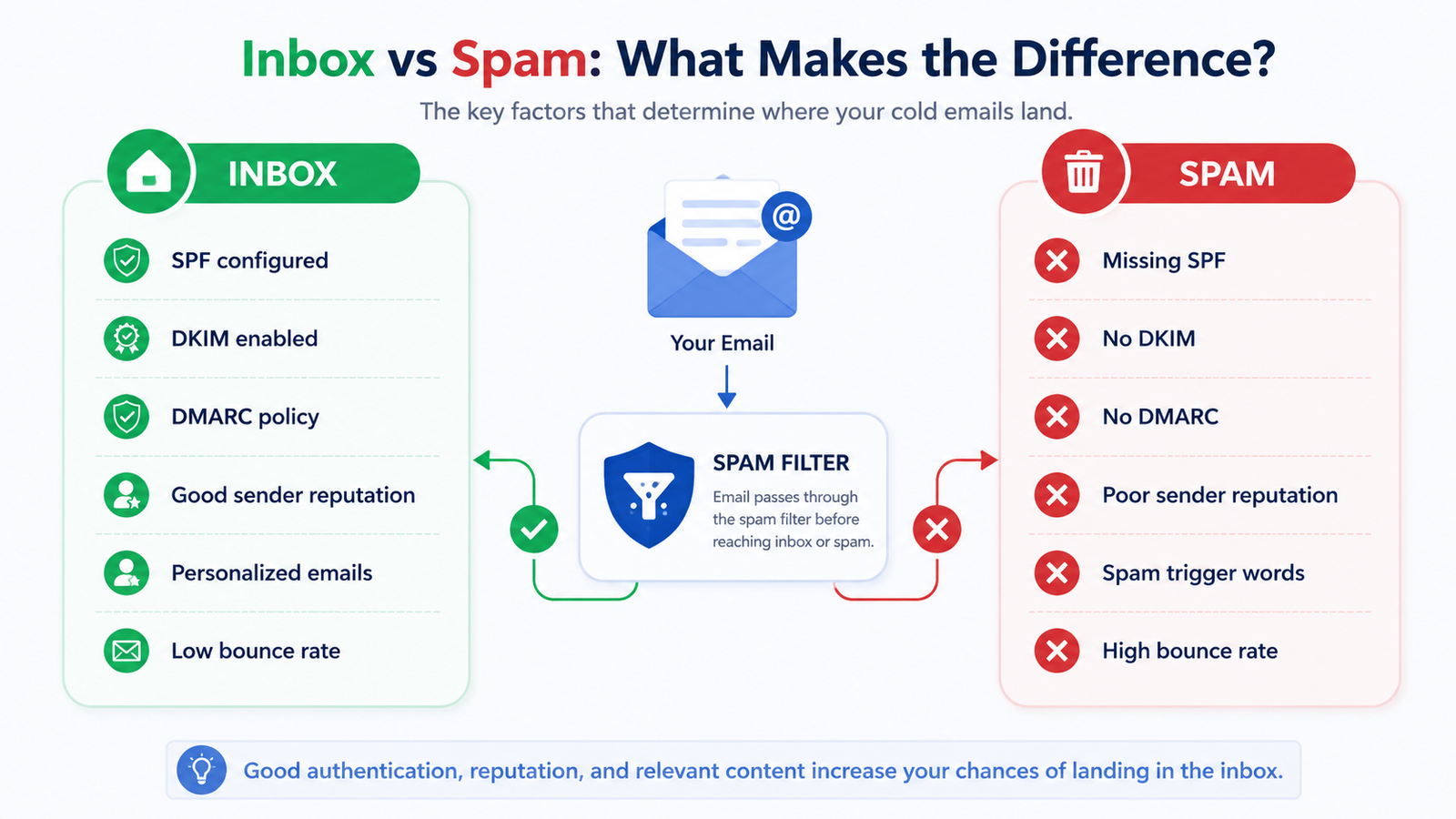
The good news is that most deliverability problems are preventable. By understanding what spam filters look for, you can make simple changes that significantly improve your inbox placement and campaign performance.
The Most Common Reasons
Most cold emails don’t end up in the spam folder because of a single mistake. Instead, it’s usually a combination of technical issues, poor sending practices, and a poor sender reputation.
Understanding these common issues is the first step toward improving your email deliverability and increasing your inbox placement.
How to Stop Cold Emails from Going to Spam: 15 Proven Ways
Improving email deliverability requires a combination of technical setup, good sending practices, and ongoing monitoring. The following proven strategies can help you increase inbox placement, build a stronger sender reputation, and improve the success of your cold email campaigns.
1.Warm Up Your Email Account
Never start sending hundreds of cold emails from a new email account. Begin with a small number of emails each day and gradually increase your sending volume. This helps email providers recognize your account as trustworthy and improves your sender reputation over time.
2.Configure SPF, DKIM, and DMARC
Proper email authentication is essential for successful cold email campaigns. Configure SPF, DKIM, and DMARC records for your domain to verify your identity and reduce the chances of your emails being flagged as spam.
3.Verify Your Email List
Remove invalid, inactive, and risky email addresses before launching any campaign. A clean email list reduces bounce rates, protects your sender reputation, and improves overall deliverability.
4.Personalize Every Cold Email
Generic emails are more likely to be ignored or marked as spam. Personalize your cold emails by mentioning the recipient’s name, company, or a relevant business detail. Personalized emails improve engagement and increase the chances of landing in the inbox.
5.Avoid Spam Trigger Words
Avoid using excessive promotional words such as “Free”, “Guaranteed”, “Act Now”, or writing in ALL CAPS. Spam filters analyze email content, so writing naturally and providing genuine value helps improve deliverability.
6.Monitor Your Sender Reputation
Your sender reputation directly affects whether your emails reach the inbox or spam folder. Regularly monitor your domain health, spam complaints, bounce rates, and engagement metrics to identify problems before they impact your campaigns.
7.Limit Your Daily Sending Volume
Sending too many emails from a new domain can trigger spam filters. Start with a low daily sending limit and gradually increase the volume as your domain builds trust and a positive sending history.
8.Use a Dedicated Domain for Cold Email
Instead of using your primary business domain, consider using a dedicated domain for cold outreach. This protects your main domain’s reputation while allowing you to safely scale your email campaigns.
⭐ Recommended Tool: WarmupInbox
If you’re serious about improving email deliverability, WarmupInbox helps automate email warmup, improve your sender reputation, and increase inbox placement for cold email campaigns.
9.Write Better Subject Lines
Your subject line is the first thing recipients see. Keep it short, relevant, and natural. Avoid clickbait, excessive punctuation, or spam-trigger words like “FREE”, “URGENT”, or “GUARANTEED”. A personalized subject line can improve both open rates and inbox placement.
10.Test Your Emails Before Sending
Before launching a campaign, send test emails to Gmail, Outlook, Yahoo, and other major providers. Testing helps identify formatting issues, broken links, and potential spam filter problems before reaching your audience.
11.Encourage Positive Engagement
Email providers monitor how recipients interact with your emails. Replies, opens, and clicks send positive engagement signals that improve your sender reputation and increase the chances of future emails reaching the inbox.
12.Monitor Your Email Performance
Track important metrics such as delivery rate, bounce rate, open rate, reply rate, and spam complaints. Monitoring these metrics helps you quickly identify problems and continuously improve your cold email campaigns.
13.Keep Your Email Content Simple
Use plain text or simple HTML emails instead of heavily designed templates. Keep your formatting clean, avoid excessive links or large images, and focus on providing value to your recipients.
14.Avoid Buying Email Lists
Purchased email lists often contain outdated, invalid, or uninterested contacts. Sending emails to these lists can increase bounce rates, spam complaints, and damage your sender reputation. Building an organic email list is always the better long-term strategy.
15.Use an Email Warmup Tool
If you’re starting with a new domain or noticing poor email deliverability, an email warmup tool can help establish a positive sender reputation. By gradually increasing email activity and generating natural engagement, these tools improve the likelihood of your emails reaching the inbox instead of the spam folder.
Recommended Tool: WarmupInbox
WarmupInbox is designed to help businesses improve email deliverability through automated email warmup. It gradually builds your sender reputation by creating natural email interactions, making it easier for your cold emails to reach the inbox. As of publication, it also offers a 7-day free trial.
✔ Automated email warmup
✔ Improves sender reputation
✔ Better inbox placement
✔ Easy to set up
✔ 7-day free trial
How Email Warmup Works
Email warmup is the process of gradually increasing email activity from a new or inactive email account. During the warmup process, emails are automatically sent, received, opened, replied to, and marked as important. These positive engagement signals help build your sender reputation, increasing the chances of your future emails reaching the inbox instead of the spam folder.
Why WarmupInbox Is Worth Considering
WarmupInbox is designed to help businesses, marketers, agencies, and sales teams improve email deliverability through automated email warmup. Instead of manually warming up email accounts, the platform automates the entire process, helping build a stronger sender reputation and improving inbox placement over time.
Key Features:
- Automated email warmup
- Improves sender reputation
- Better inbox placement
- Easy setup
- 7-day free trial (at the time of writing)
- Works with popular email providers
Who Should Use WarmupInbox?
WarmupInbox is a good choice for freelancers, startups, agencies, sales teams, recruiters, and businesses that rely on cold email outreach. It’s especially useful for new domains or email accounts that need to establish trust with email providers before sending campaigns at scale. By using WarmupInbox consistently, businesses can help stop cold emails from going to spam, improve sender reputation, increase inbox placement, and achieve higher reply rates and better campaign performance.
Frequently Asked Questions
1.How can I stop cold emails from going to spam?
The best way to stop cold emails from going to spam is to authenticate your domain, warm up your email account, and maintain a clean email list.
2.How can I stop my cold emails from going to spam?
To stop cold emails from going to spam, authenticate your domain with SPF, DKIM, and DMARC, warm up your email account, maintain a clean email list, personalize every message, and gradually increase your sending volume. Consistently monitoring your sender reputation and campaign performance will help improve inbox placement and maximize your email deliverability over time.
3.What is email warmup?
Email warmup is the process of gradually building trust with email providers by sending and receiving emails in a natural way. It helps improve sender reputation and increases the chances of emails reaching the inbox.
4.How long does email warmup take?
Most email accounts need between 2 and 8 weeks of consistent warmup, depending on the domain age, sending history, and email provider.
5.Is WarmupInbox worth using?
WarmupInbox is a useful solution for businesses, agencies, and sales teams that rely on cold email outreach. It automates the warmup process and helps improve sender reputation over time.
6.Can email warmup guarantee inbox placement?
No. While email warmup can improve your sender reputation, inbox placement also depends on email authentication, content quality, recipient engagement, and overall sending practices.
7.Should I use my main business domain for cold emails?
Many businesses use a separate domain for cold outreach to protect the reputation of their primary business domain while scaling email campaigns safely.
8.What is a good email bounce rate?
A healthy email bounce rate is generally below 2%. Higher bounce rates may indicate poor email list quality and can negatively affect your sender reputation.
9.Does personalizing cold emails improve deliverability?
Yes. Personalized emails often receive better engagement, which can contribute to a stronger sender reputation and better inbox placement over time.
10.What is the best way to improve email deliverability?
The best approach combines proper domain authentication, regular email warmup, list verification, personalized content, gradual sending, and continuous monitoring of your sender reputation.
Conclusion
Getting cold emails into the inbox isn’t about finding a single trick. By setting up SPF, DKIM, and DMARC, warming up your domain, maintaining a clean email list, and personalizing your outreach, you can significantly improve email deliverability. Consistently following these best practices helps more emails reach the inbox instead of the spam folder.
If you want to stop cold emails from going to spam, you need to combine proper email authentication, sender reputation management, list hygiene, and email warmup.
Whether you’re a freelancer, agency, startup, or sales team, investing time in improving your sender reputation can significantly increase reply to rates and campaign success. By applying the strategies covered in this guide and using the right tools, you’ll be in a much better position to scale your cold email outreach with confidence.
Recommended Tool: WarmupInbox
If you’re looking to stop cold emails from going to spam, WarmupInbox helps automate email warmup, improve your sender reputation, and increase inbox placement. It’s an ideal solution for businesses, agencies, and sales teams that rely on cold email outreach to achieve better email deliverability.
Ready to Improve Your Email Deliverability?
If you’re looking to stop cold emails from going to spam, WarmupInbox can help automate email warmup, build sender reputation, and increase inbox placement.